
Key takeaways
- Social media data collection defined: The process of gathering performance metrics, audience information, and public conversation data from social platforms to inform your strategy.
- Essential tracking priorities: The most valuable data depends on your goals, but enterprise teams should prioritize engagement, reach, sentiment, conversions, and competitive share of voice.
- Effective collection methods: Successful approaches include analytics tools, social listening, surveys, community engagement, competitor analysis, and API integrations.
- Compliance is non-negotiable: Legal compliance with regulations like GDPR and CCPA, along with platform terms of service, is required for enterprise social media data collection.
What is social media data?
Social media data is the information you collect from social media platforms about your audience, content, and performance. The largest platform, Facebook, has over three billion monthly active users.
Some of this comes from social media analytics tools, like impressions, clicks, reach, and follower growth. Other data comes from what people say publicly, like posts, comments, hashtags, or mentions. You can track that kind of data using social listening tools.
It’s also worth distinguishing between first-party data (metrics and audience info from your own accounts) and publicly available data (mentions, hashtags, and conversations happening across the wider platform). Both are valuable, and most social media data collection strategies use a mix of the two.
This data helps you understand what’s happening on your channels, what’s resonating with your audience, and where you can improve. It’s like turning on the lights in a room you’ve been guessing your way through. Suddenly, you can see what’s working and where to go next.
What’s the difference between data collection, mining, and extraction?
Data collection, mining, and extraction are three key steps in using social media data effectively.
You can think of it like this:
- Collection: Gathering
- Mining: Analyzing
- Extraction: Exporting or isolating the pieces you need
Each step plays a different role in turning raw numbers into decisions that actually help you grow.
|
Step |
What it means |
Example |
|---|---|---|
|
Collection |
Gathering raw data from platforms |
Pulling engagement metrics from Instagram Insights |
|
Mining |
Analyzing data to find patterns |
Identifying which post types drive the most saves |
|
Extraction |
Isolating specific data points you need |
Exporting top-performing posts to a report |
Why is social media data collection important?
Social media marketing works best when your strategy is backed by real data, not just hunches.
Tracking the right data helps you understand what’s landing with your audience and just as importantly, what’s falling flat. From there, you can make smarter decisions, test new ideas, and adjust your marketing strategy as you go.
For enterprise teams, social media data collection also supports governance, cross-team alignment, and consistent reporting. When multiple departments contribute to social, having a single source of truth keeps everyone working from the same playbook.
Social media data can help answer questions like:
- What is the demographic profile of your following on each social platform?
- What times of day is your audience most active on social media sites?
- Which hashtags is your audience most likely to engage with?
- Does your audience prefer images or video posts?
- What types of content your audience is interested in?
- What subjects does your audience need help with?
- Which top-performing organic posts should you pay to boost?
You can also use data to run simple A/B tests. Try out different versions of a message, post, or ad, and see which performs better. Over time, this helps you fine-tune your content and improve your ROI.
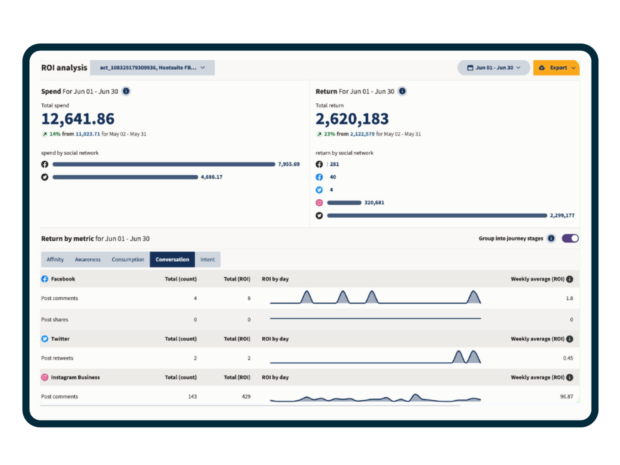
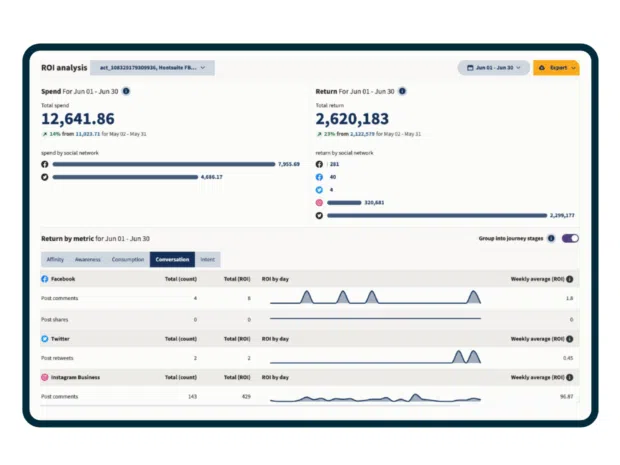
Hootsuite Analytics provides a clear view of ROI across your social channels.

Demographic breakdowns in Hootsuite Analytics help you understand who your audience is and where they’re located.
#1 Analytics Tool for Growth
Beautiful reports. Clear data. Actionable insights to help you grow faster.
What social media data should you track?
The best social media data to track depends on your goals. Are you trying to grow your audience? Boost engagement? Drive more traffic to your website?
Different goals call for different social media metrics.
Before you decide what to track, make sure your goals are clear and measurable. (This is where SMART goals come in: specific, measurable, achievable, relevant, and time-bound.) Once you know where you’re headed, you can start collecting the right data points to measure progress.
Use the SMART framework to set clear, measurable goals for your social media strategy.
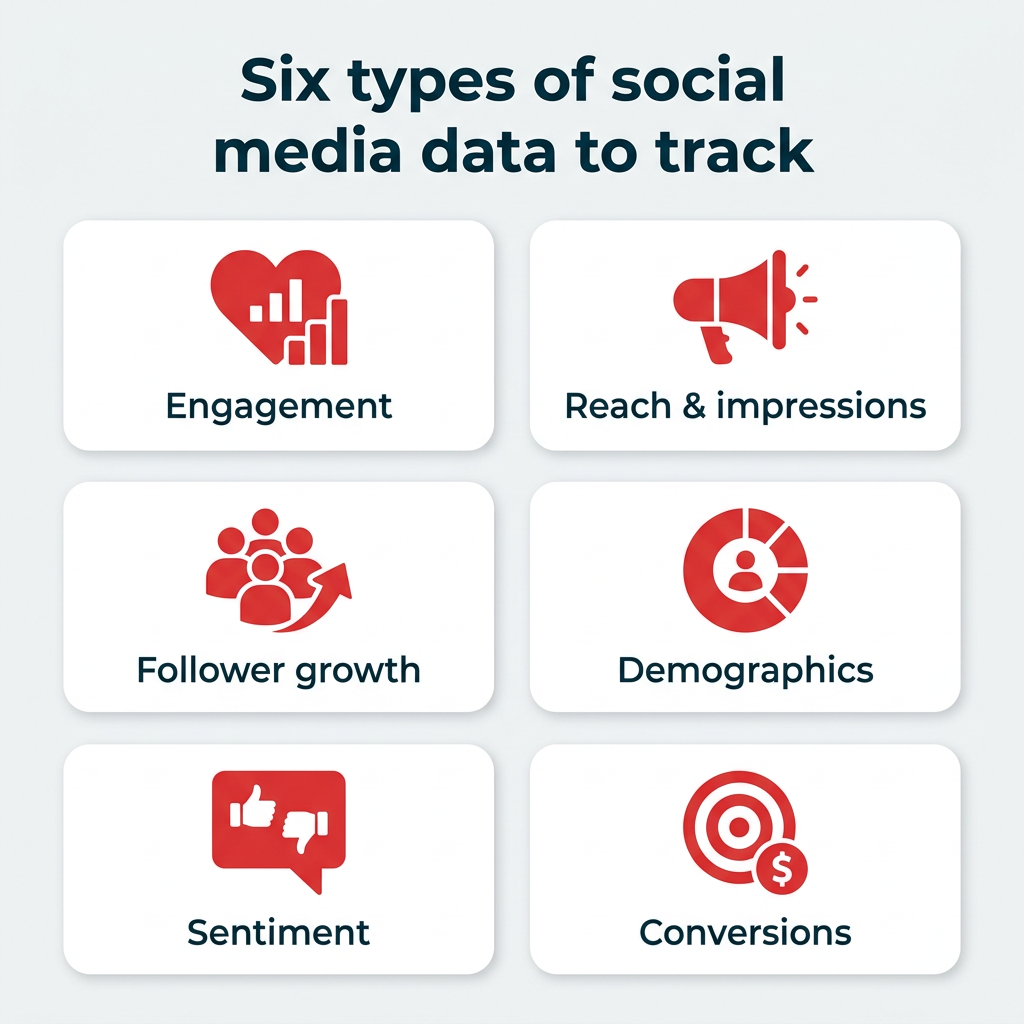
Below are some of the most useful types of social media data to track, organized by what they help you learn.
Engagement metrics
What they show: How people are interacting with your content in real time.
What they include:
- Likes
- Comments
- Shares and reposts
- Saves
- Link clicks
- Video completions
- Engagement rate
Why you should track them: Engagement tells you what your audience finds interesting, helpful, or entertaining. A strong engagement rate means your content is resonating, and can help boost your visibility in the algorithm.
Reach and impressions
What they show: How many people see your content (and how often).
What they include:
- Total reach
- Average reach per post
- Impressions
- Video views
- Profile visits
Why you should track them: These numbers help you understand how far your content is spreading. If you’re focused on growing brand awareness or entering new markets, this is a key metric set.
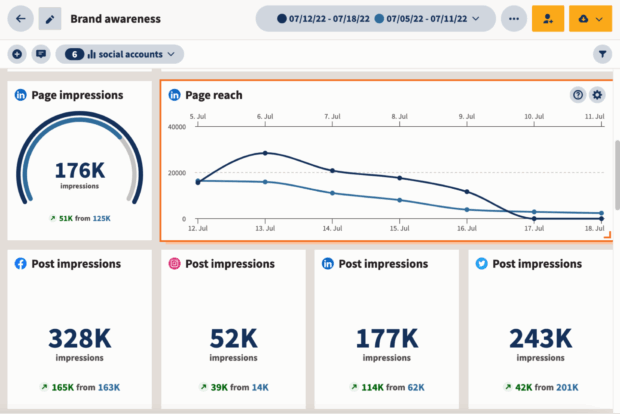
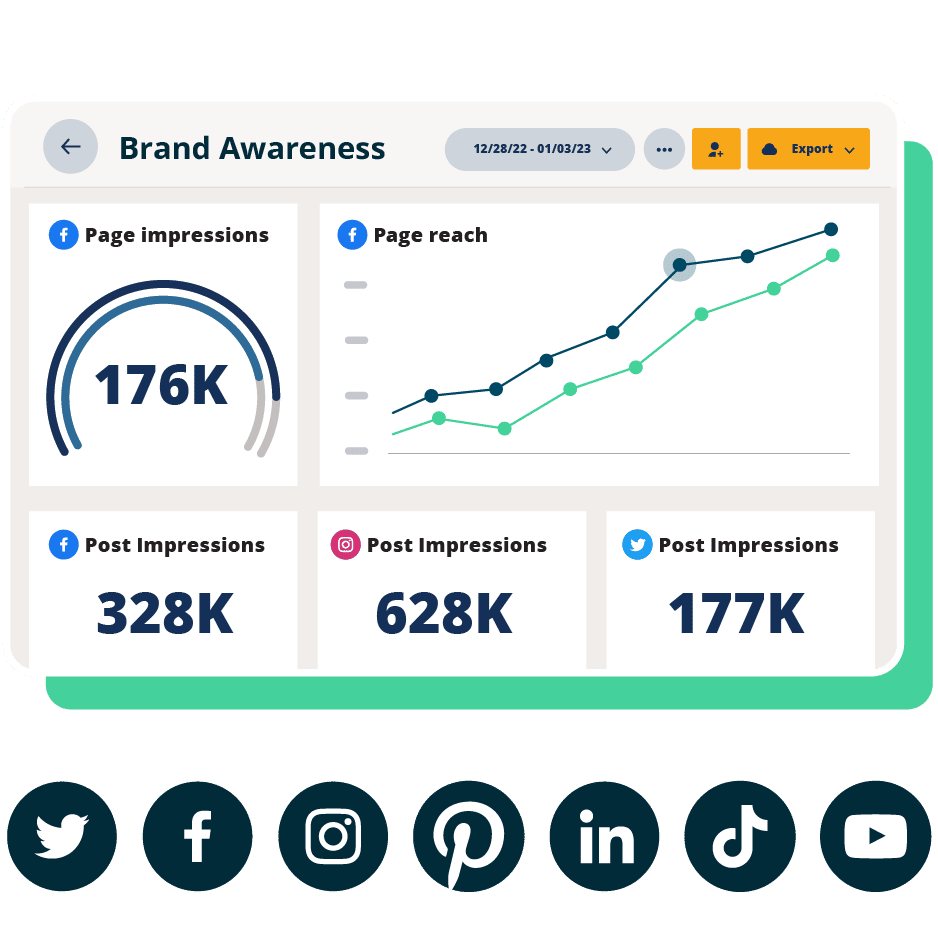
Track brand awareness metrics like reach and impressions across all your social channels in one dashboard.
Follower growth
What it shows: Whether your audience is growing, shrinking, or holding steady.
What it includes:
- Total followers
- New followers
- Unfollows
- Net follower growth
Why you should track it: Follower growth shows long-term audience interest. It’s not the only metric that matters, but paired with engagement, it gives you a better picture of overall brand momentum.
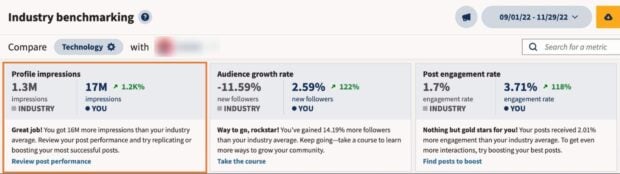
Compare your follower growth and engagement rates against industry benchmarks to see how you stack up.
Pro tip: Use Hootsuite’s industry benchmarking tool to compare your performance against your competitors.
Demographic data
What it shows: Who your audience is.
What it includes:
- Age
- Gender
- Location
- Language
- Device type
- Time of activity
Why you should track it: Knowing your audience insights helps you create content that actually fits their interests, needs, and habits. It also helps with paid targeting and campaign timing, especially when 55% of women use Instagram vs. 44% of men.
Sentiment and brand perception
What it shows: How people feel about your brand.
What it includes:
- Positive vs. negative mentions
- Comments and feedback
- Keywords related to your brand or industry
- Tone and emotion in conversations
Why you should track it: Sentiment analysis helps you understand brand reputation, catch potential issues early, and identify moments to celebrate or fix. This data often comes from social listening tools.
Share of voice
What it shows: How much people are talking about your brand compared to others in your space.
What it includes:
- Brand mentions
- Competitor mentions
- Campaign hashtag usage
- Share of overall conversation
Why you should track it: Share of voice is a helpful way to benchmark your performance, spot trends, and track the impact of campaigns, especially when compared to competitors.
Conversion and website traffic
If your social strategy is tied to business outcomes (and it should be), conversion data is essential.
What it shows: Whether your social content is driving people to take action beyond the platform.
What it includes:
- Click-through rate (CTR)
- Landing page visits from social
- UTM-tagged campaign traffic
- Sign-ups, purchases, or form completions attributed to social
- Cost per conversion (for paid campaigns)
Why you should track it: Conversion data connects your social efforts directly to revenue and lead generation. Use UTM parameters on your links and pair your social analytics with Google Analytics to see the full journey from post to purchase. Hootsuite Analytics integrates with Google Analytics, making it easier to track social conversions on your site.
How do you collect social media data?
Most social platforms give you basic analytics, but to really understand what’s working and where to focus, you need a full view across channels.
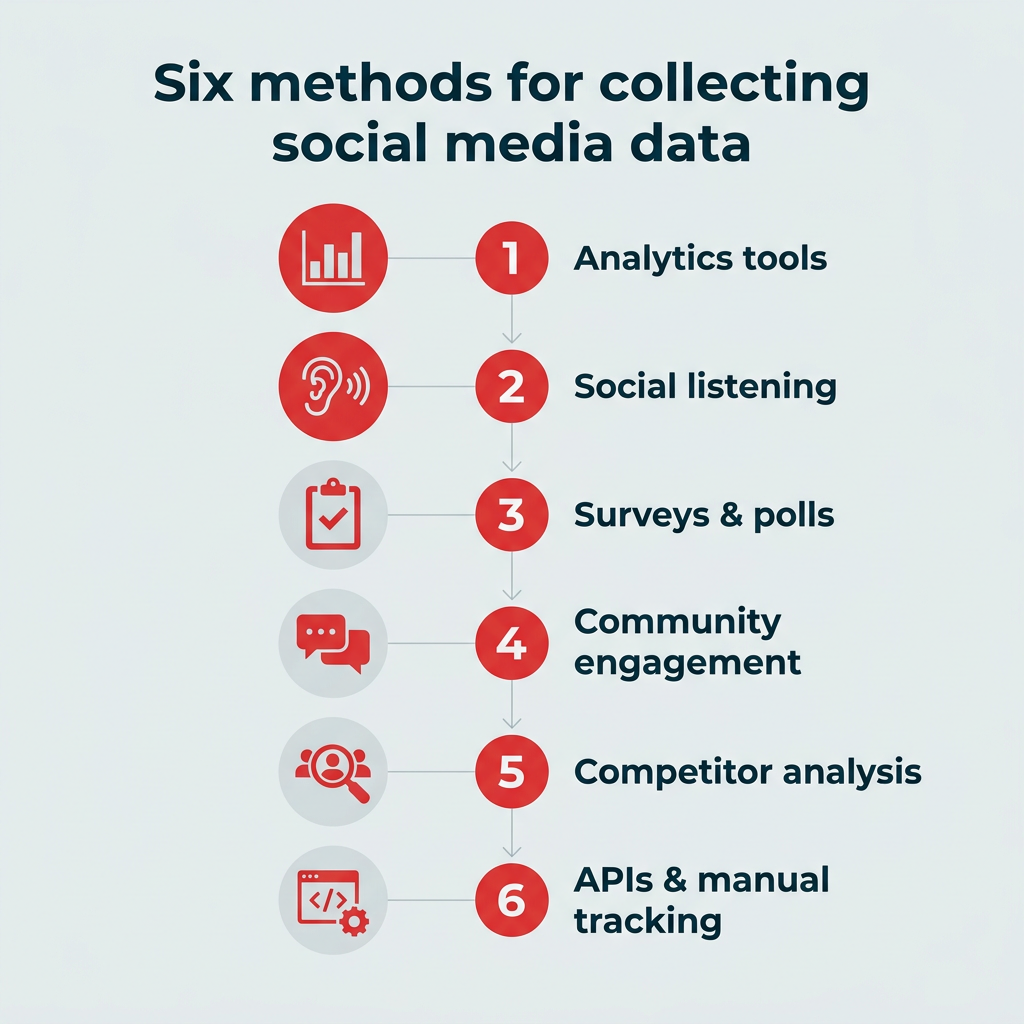
There are several social media data collection methods to choose from, and the best approach usually combines a few of them. Here’s a summary of the six most common methods, followed by a detailed breakdown of each:
- Use analytics tools to gather performance metrics from your own accounts.
- Set up social listening to track public conversations, mentions, and sentiment.
- Run surveys and polls to collect qualitative feedback directly from your audience.
- Engage with your community to surface insights from comments, DMs, and UGC.
- Analyze your competitors to benchmark performance and spot opportunities.
- Use APIs and manual tracking for advanced or custom data needs.
1. Use analytics tools
Every social network has its own built-in analytics. These are a great starting point for checking things like reach, clicks, and engagement on individual social media posts. They are generally user-friendly, but fairly limited in the type of datasets they can offer.
To get the full picture, you’ll want to use a tool that brings all your data together, particularly with engagement rates diverging sharply across platforms.
Hootsuite Analytics lets you track performance across platforms in one place.
You can compare how your audience responds on different channels, spot high-performing content, and create custom dashboards for your team or clients. It also shows how your data connects to business goals, like conversions or customer care.
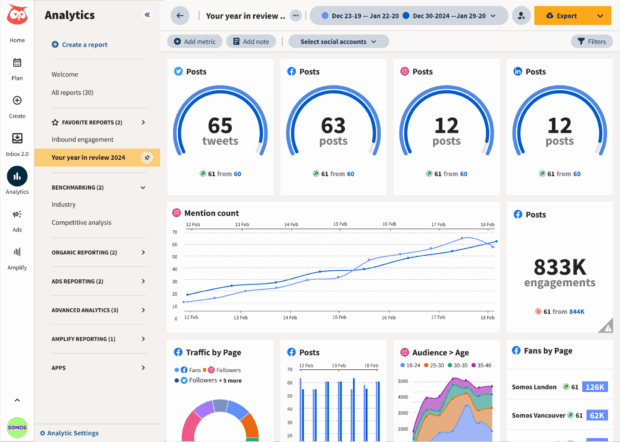
Monitor performance across all your social channels with Hootsuite’s unified analytics dashboard.
Pro tip: Need more detail? Hootsuite Advanced Analytics helps you dig deeper, with competitive benchmarks, campaign tracking, and flexible data filtering.
2. Set up social listening
Not all social data lives in charts and dashboards. A lot of valuable information comes from what people say about your brand, whether they tag you or not.
Social listening helps you track those public conversations. You can monitor keywords, hashtags, sentiment, and even competitor mentions to see how people are talking about your industry.
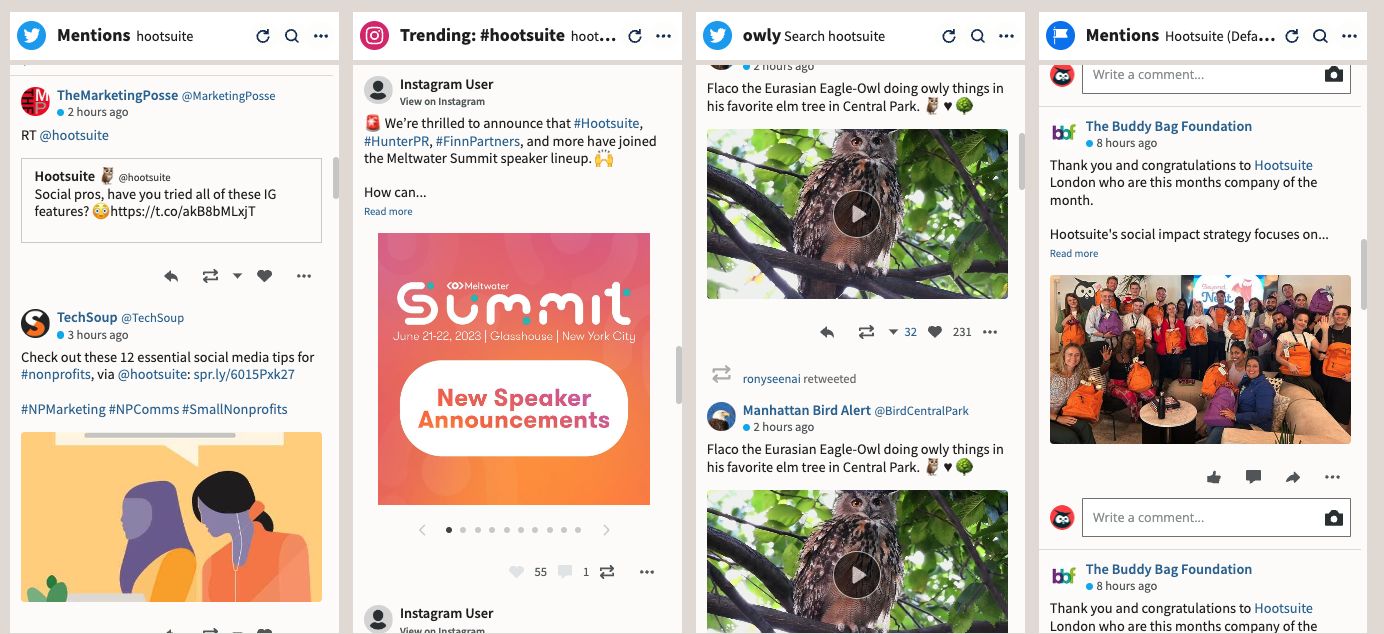
Hootsuite’s social listening tools help you spot trends early, find customer feedback, and uncover moments for proactive engagement. Listening gives you context that pure numbers can’t. It tells you why something is happening, not just what is happening.
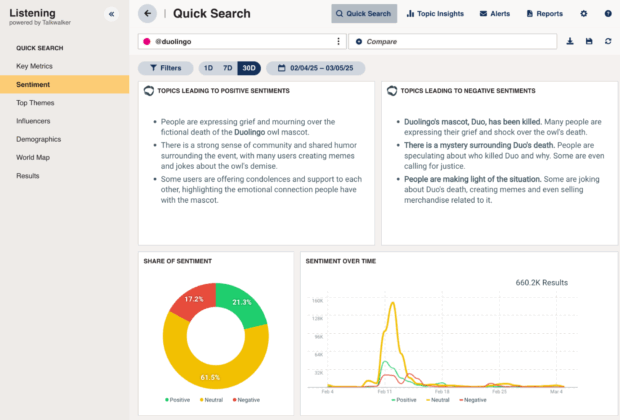
Use Hootsuite Listening to identify which topics drive positive or negative sentiment around your brand.
3. Run surveys and polls
Analytics and listening tell you what people do. Surveys and polls tell you what they think.
Platform-native tools like Instagram Stories polls, LinkedIn polls, and X polls make it easy to ask your audience quick questions without leaving the app. You can test content ideas, gauge interest in a new product, or simply learn more about what your followers want to see.
For deeper research, third-party survey tools (like Typeform or Google Forms) let you collect more detailed qualitative data. Share the link in your bio, in a post, or through DMs to drive responses.
Surveys are especially useful when you want to understand the “why” behind your numbers. If engagement dropped on a certain content type, a quick poll can help you figure out whether the topic, format, or timing was the issue.
4. Engage with your community
Sometimes the best data comes from simply paying attention to what your audience tells you directly.
Comments, DMs, replies, and user-generated content (UGC) are all rich sources of qualitative data. They reveal pain points, product feedback, content preferences, and even language your audience uses to describe their needs.
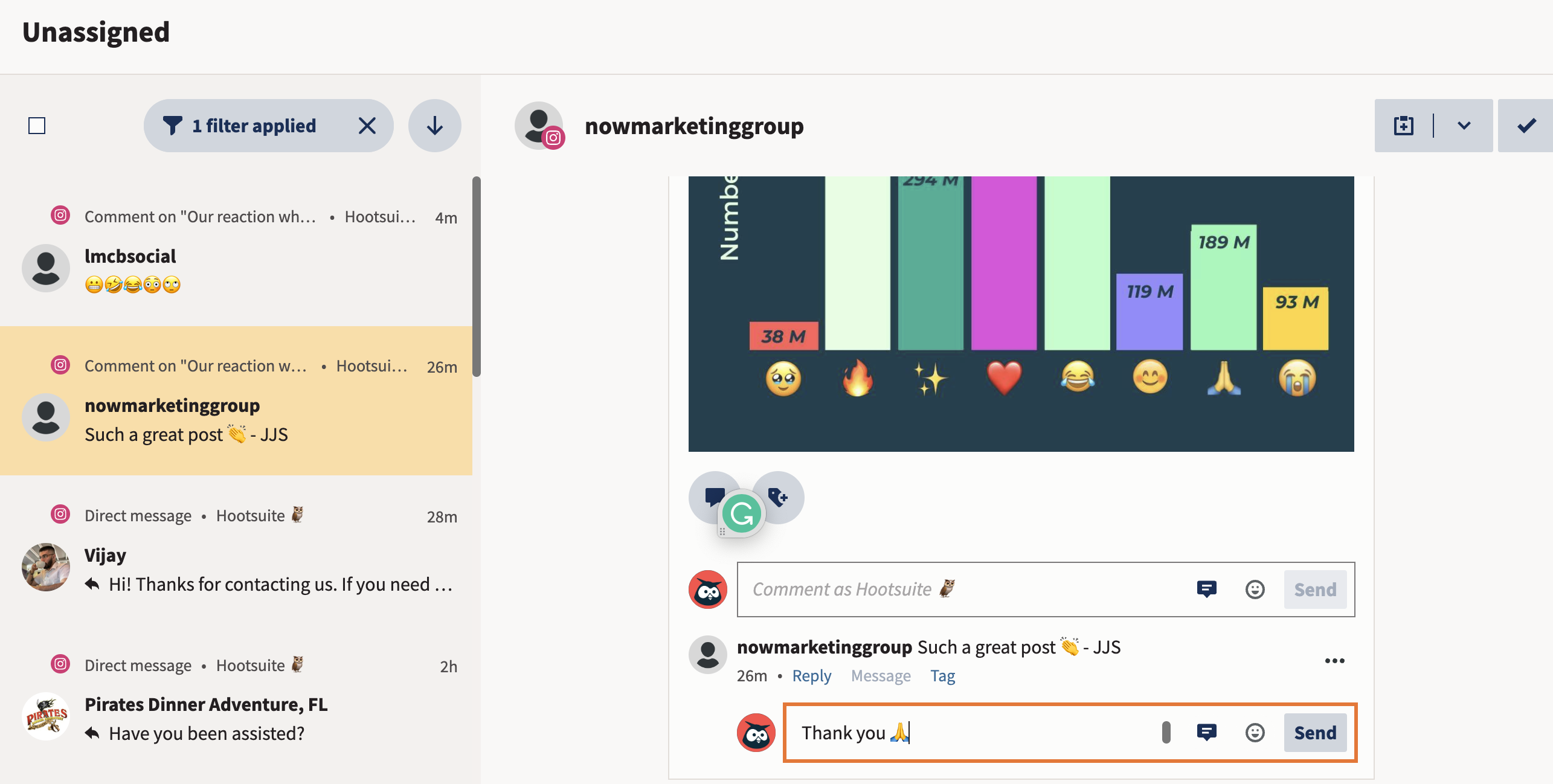
Make it a habit to review incoming messages and comments regularly. Look for recurring themes, common questions, and sentiment shifts. If you’re running a UGC campaign, track what people create and share to understand how they perceive your brand.
This kind of active engagement doesn’t just collect data. It also builds trust and strengthens your relationship with your audience.
5. Analyze your competitors
Your competitors’ social presence is a valuable data source, too.
Competitive benchmarking helps you understand how your performance stacks up, which content formats are working in your industry, and where there are gaps you can fill.
Hootsuite’s competitive benchmarking tools let you monitor up to 20 competitors (on the Advanced plan) and compare key metrics side by side. Combined with social listening, you can also track how audiences talk about competitor brands and identify opportunities to differentiate.
6. Use APIs and manual tracking
For teams with more advanced needs, platform APIs allow you to pull raw social data directly into your own databases or dashboards. This is common for enterprise teams that need custom reporting or want to integrate social data with CRM or BI tools.
If you’re a smaller team or just getting started, manual tracking with a spreadsheet works well. Our free social media data analysis template can help you get set up fast. It’s built to track your top social media metrics, visualize changes month to month, and keep your goals front and center.
How do you organize and share social media data?
Collecting data is only the first step. To make it useful, you need a system to organize it and a plan for sharing it with the right people.
How to organize your data
If you’re just starting out, a spreadsheet works well for social media data collection. Use it to track performance by platform, post type, or campaign.
For larger teams or growing accounts, it helps to use a tool that can scale with you. Hootsuite Analytics automatically collects and organizes your data across platforms, so you can skip the manual work and focus on the insights. You can tag campaigns, filter by content type, and view progress toward specific KPIs in real time.
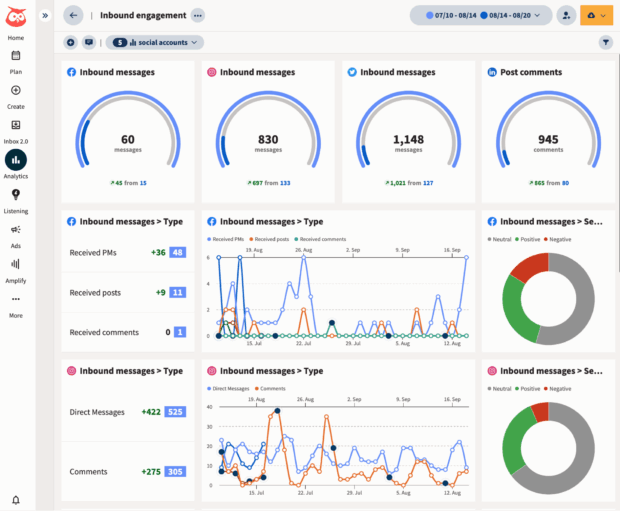
Organize your social media data by campaign, platform, or content type for easier analysis and reporting.
Not every metric matters equally, so be intentional. Tracking fewer things well is better than tracking everything and getting overwhelmed. Stick to the numbers that relate to your goals.
How to share data with your team
Once you’ve collected and organized your data, the next step is sharing it in a way that makes sense to your team and supports decision-making.
Not everyone needs to see every number. Think about your audience when creating social media reports.
- A social media manager might want post-level engagement trends.
- A creative team might care more about what visuals or formats are landing.
- Leadership likely wants to see how your work connects to business goals like reach, conversions, or brand awareness.
That’s where social media reports come in.
Hootsuite Analytics makes social media reporting easy. You can build custom reports that pull in the exact data your team needs by campaign, platform, date range, or metric.
Need something fast for a stakeholder meeting? One click, and your report is ready to download or share.
However, if you prefer building reports manually, try our free social media report template. It’s clean, flexible, and helps you show the story behind the stats, not just a list of numbers.
Pro tip: Don’t just report on what happened. Add a short takeaway at the end of each report that answers: What should we do next based on this data?
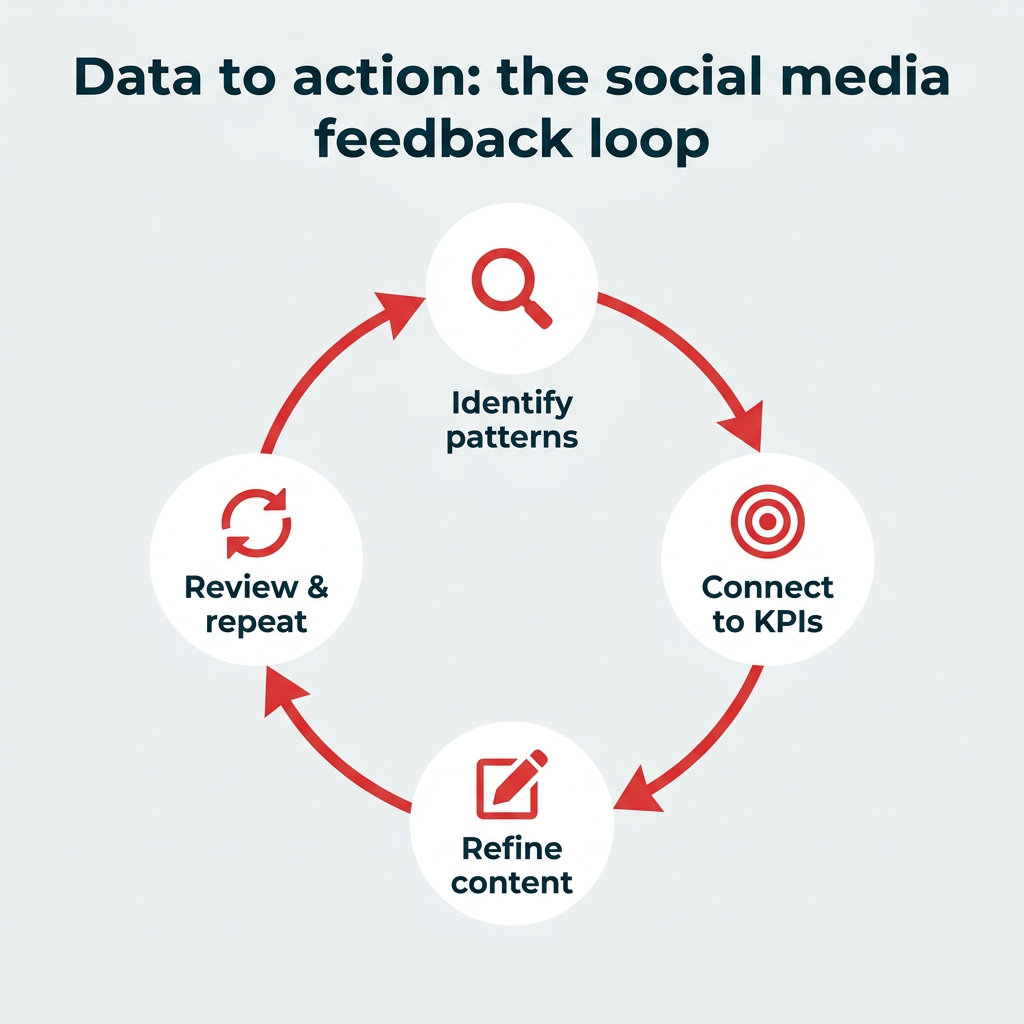
How do you turn social media data into actionable insights?
Having a dashboard full of numbers is one thing. Knowing what to do with them is another.
The real value of social media data collection comes when you connect what you’re seeing to what you’re doing. Here’s how to bridge that gap:
- Identify patterns and trends. Look beyond individual posts. Are certain formats consistently outperforming others? Is engagement higher on specific days or times? Monthly reviews help surface these patterns.
- Connect data to business KPIs. Tie your social metrics to outcomes your leadership cares about, like website traffic, lead generation, or customer retention. This makes it easier to justify investment and prioritize efforts.
- Use data to inform content strategy. If short-form video consistently drives more reach than static images, that’s a signal to shift your content mix. Let the data guide your creative decisions.
- Build a feedback loop. Data collection shouldn’t be a one-time exercise. Set a regular cadence (weekly check-ins, monthly deep dives) to review performance, adjust your approach, and test new ideas based on what you’ve learned.
The goal isn’t to track everything. It’s to track the right things, learn from them, and use those lessons to make your next move smarter than your last.
What are the best tools for social media data collection in 2026?
The right tool depends on the size of your team, the depth of data you need, and how many platforms you’re managing. Here’s a quick comparison of the main categories:
|
Tool category |
Best for |
Data types collected |
|---|---|---|
|
All-in-one social media platforms (e.g., Hootsuite) |
Enterprise and mid-size teams managing multiple channels |
Engagement, reach, follower growth, sentiment, competitive benchmarks, conversions, campaign performance |
|
Social listening tools |
Brand monitoring, sentiment analysis, trend detection |
Mentions, keywords, sentiment, share of voice, competitor conversations |
|
Native platform analytics (e.g., Meta Business Suite, LinkedIn Analytics) |
Quick checks on individual platform performance |
Post-level engagement, reach, impressions, basic audience demographics |
|
Web analytics tools (e.g., Google Analytics) |
Tracking social traffic and conversions on your website |
Referral traffic, UTM campaign data, conversion attribution |
|
Spreadsheets and manual tracking |
Small teams or custom reporting needs |
Any metric you manually input; flexible but time-intensive |
Hootsuite brings analytics, social listening, competitive benchmarking, and reporting into one platform. For enterprise teams, that means less time switching between tools and more time acting on insights.
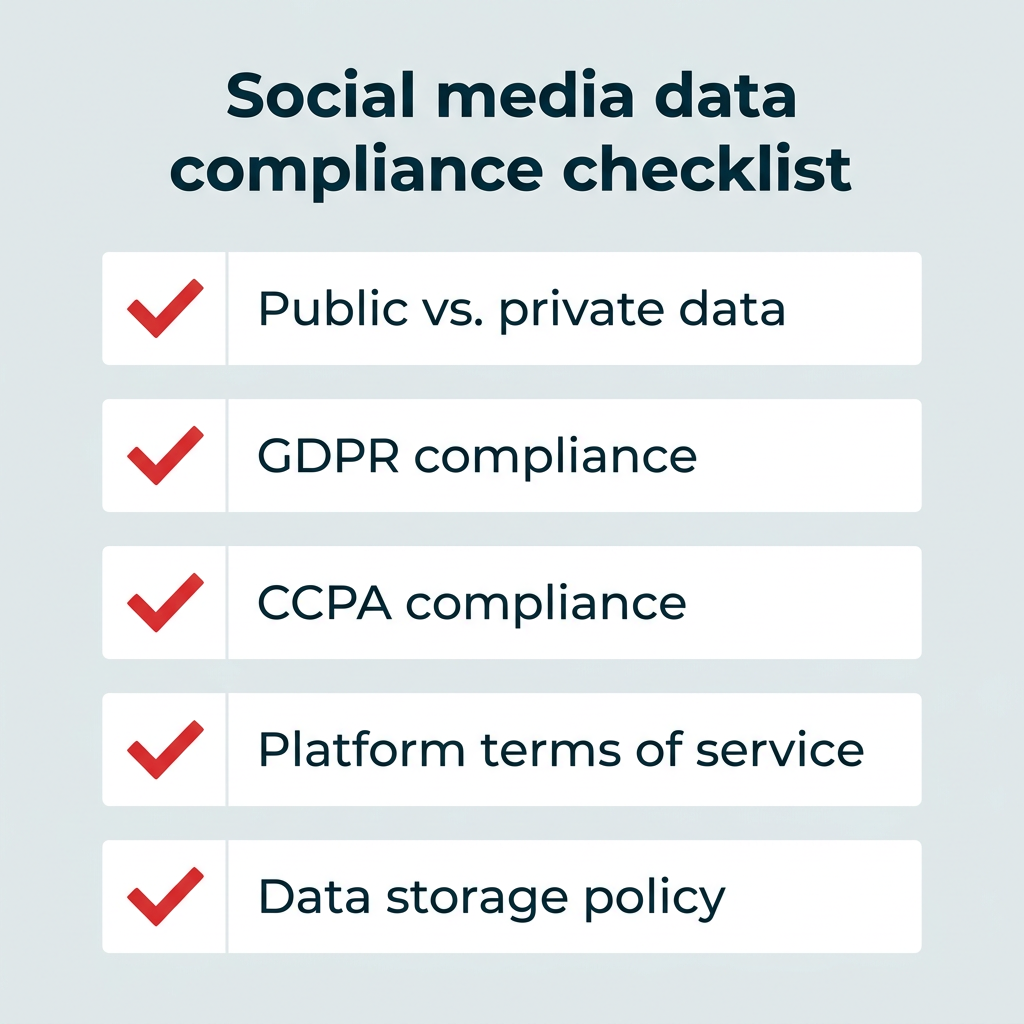
What are the legal and ethical considerations for social media data collection?
Collecting social media data is standard practice, but it comes with real legal and ethical responsibilities, especially for enterprise teams.
Here’s what you need to keep in mind:
- Public vs. private data. Data that users share publicly (posts, comments, hashtags) is generally accessible. Private messages, closed group content, or data behind privacy settings requires explicit consent to collect or use.
- GDPR compliance. If you collect data from users in the EU, the General Data Protection Regulation (GDPR) applies. This includes requirements around consent, data storage, and the right to be forgotten.
- CCPA compliance. For users in California, the California Consumer Privacy Act (CCPA) gives consumers the right to know what data is collected about them and to request its deletion.
- Platform terms of service. Each social platform has its own rules about how data can be collected, stored, and used. Violating these terms can result in account suspension or legal action. Always review the platform’s developer and data policies before using APIs or third-party scraping tools.
- Data storage and retention. If you’re storing social data (even aggregated analytics), have a clear policy for how long you keep it and who has access. This is especially important for regulated industries.
The bottom line: use dedicated compliance tools built with data protection in mind, stay current on regulations that apply to your audience, and never collect data in ways that violate user privacy or platform rules. Hootsuite follows data privacy laws including GDPR and CCPA to help ensure compliance.
What do the experts say about collecting social media data?
Taylor Knight, Social Media Manager at Vessi, uses data to guide her social media strategy, streamline reporting, and keep her team aligned. These are her go-to tips for using social media data collection to drive business results, not just track metrics.
1. Start with the purpose of the post
At Vessi, every piece of content has a job to do, and they measure its success accordingly. Knight puts it:
“You can’t always have a post that is record-breaking across all metrics, so identify the purpose behind a post and what metrics you want to monitor, and judge a post’s performance based on those.”
Instead of measuring every post by likes or views alone, she recommends tracking the metric that aligns with the post’s goal, whether that’s reach, clicks, or comments. This approach keeps reporting focused and helps avoid decision fatigue.
Try this: Use Hootsuite’s campaign tagging feature to label content by objective (e.g. “brand awareness,” “engagement,” “product launch”). This makes it easier to pull custom reports and compare results by intent, not just by platform.
2. Focus on reach and shares, not just follower count
While follower growth is often used as a benchmark, Knight says it’s not always the best indicator of organic success, especially when multiple teams contribute to audience growth.
“Reach, average reach per post, and shares are my favourite metrics for growing our organic social,” says Knight.
These numbers show how far your content is going and whether people are sharing it with their own audiences. It’s an often overlooked growth signal!
Try this: In Hootsuite Analytics, sort your top posts by reach and shares to find the content that’s driving organic growth.
3. Zoom out to find repeatable patterns
Knight’s team tracks performance at both the micro and macro levels. They monitor individual post data for quick feedback, but they also step back once a month to look for trends.
“We zoom out and do monthly reports to look at trends within our content and see what’s helping us achieve our goals,” explains Knight. After a few months, clear patterns start to emerge. These insights help refine their content strategy and back up decisions with data.
Try this: Use Hootsuite Analytics’ comparison tools to view data month-over-month and identify patterns in reach, engagement rate, or post type.
4. Share the story behind the numbers
It’s not just about collecting data. It’s about making it useful. Knight’s team highlights the top four posts in each key category every month, using visuals to help teams across the company understand what’s working.
“This helped us clearly show other teams within our marketing department what kind of content was helping us towards our goals, so that everybody could be on the same page,” says Knight.
Try this: Use Hootsuite Advanced Analytics to build visual reports that highlight top content by metric or category. Schedule them to auto-send to your team so everyone stays on the same page.
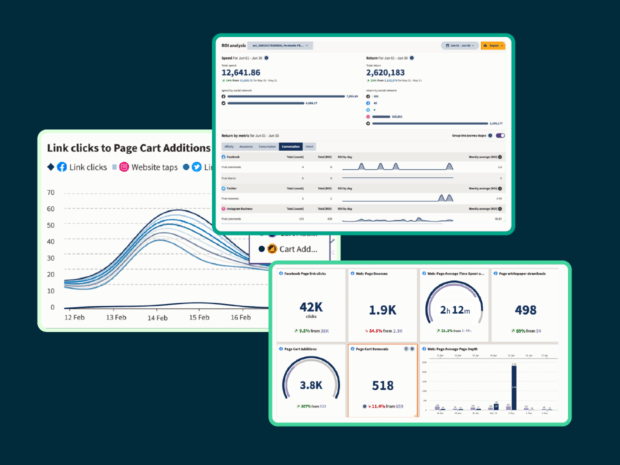
Hootsuite Advanced Analytics lets you create custom visual reports that tell the story behind your data.
Frequently asked questions
What social media apps collect data?
Social media apps that collect data include all major platforms such as Facebook, Instagram, X, TikTok, LinkedIn, and YouTube. They track things like views, clicks, likes, and profile activity to improve the user experience and help marketers understand performance.
How do I ensure my social media data collection is compliant with privacy laws?
To ensure compliance, use tools that are built with GDPR and CCPA protections, only collect publicly available data or data you have permission to use, review platform terms of service regularly, and maintain clear data storage and retention policies. Hootsuite is designed to support compliance with major data privacy regulations.
What’s the difference between social media analytics and social listening?
Social media analytics focuses on quantitative performance data from your own accounts, like engagement rates, reach, and follower growth. Social listening tracks public conversations, sentiment, and brand mentions across the broader platform, giving you qualitative insights into what people are saying about your brand or industry.
Can I collect social media data without using paid tools?
Yes, you can collect basic data using native platform analytics (like Instagram Insights or LinkedIn Analytics) and manually track metrics in a spreadsheet. However, paid tools like Hootsuite Analytics save time, provide cross-platform views, and offer advanced features like sentiment analysis, competitive benchmarking, and automated reporting.
How often should I review my social media data?
For day-to-day management, review key metrics weekly to catch trends and respond quickly. For strategic planning, conduct deeper monthly or quarterly reviews to identify patterns, assess campaign performance, and adjust your strategy based on what the data shows.
Save time managing your social media marketing strategy with Hootsuite. Publish and schedule posts, find relevant conversions, measure results, and more — all from one dashboard. Try it free today.
The post Social media data collection: A 2026 guide appeared first on Social Media Marketing & Management Dashboard.